I Tested the Alienware AW2724DM for a Month: Here is My Verdict
The Alienware AW2724DM is one of the more talked-about 27-inch gaming monitors released in recent years. Marketed toward competitive gamers and enthusiasts who want a premium balance of speed, color and HDR capability, the AW2724DM promises a lot on paper: a QHD Fast IPS panel, low response time, G-SYNC compatibility, and DisplayHDR 600 certification. After living with this monitor for a month across a range of real-world tasks—esports, single-player AAA games, creative work, and everyday productivity—this article breaks down where the AW2724DM shines, where it shows its limitations, and who should consider it.
Introduction — What this review covers
This review focuses on real-world impressions rather than raw lab data. It covers design and build, display quality, gaming performance (frame pacing, input lag impressions, and perceived motion clarity), HDR behavior, color fidelity for content work, ergonomics and connectivity, software/OSD usability, and practical buyer guidance. The monitor tested is the Alienware AW2724DM (27", QHD) as sold in 2023–2024 configurations.
Key specifications (summary)
- Panel size: 27 inches (diagonal)
- Resolution: 2560 × 1440 (QHD)
- Refresh rate: 165 Hz native, up to 180 Hz over DisplayPort (HDMI up to 144 Hz)
- Panel type: Fast IPS (10-bit via 8-bit + FRC)
- HDR: HDR10, VESA DisplayHDR 600 certified (400 nits typical, 600 nits peak in HDR)
- Adaptive sync: NVIDIA G-SYNC Compatible, AMD FreeSync Premium Pro
- Color gamut: 100% sRGB, ~95% DCI-P3
- Response time: 1 ms gray-to-gray (Extreme Mode)
- Inputs: 1 × HDMI 2.1, 2 × DisplayPort 1.4, USB upstream + downstream ports, audio out/headphone jack
- Other: VESA 100×100, adjustable stand (height/tilt/swivel/pivot), AlienFX lighting, ComfortView Plus (low blue light)
- Release year: 2023
Design and build: familiar Alienware styling with thoughtful ergonomics
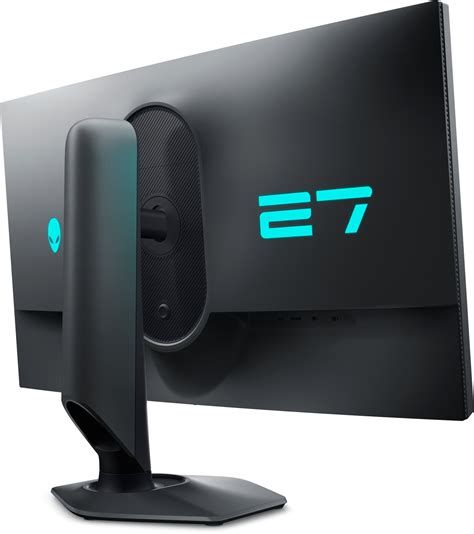
The AW2724DM carries the recognizable Alienware aesthetic: angular, futuristic lines and a matte textured finish that feels premium without being ostentatious. The stand is robust and offers a wide range of adjustment—height, tilt, swivel and pivot—so it’s easy to position the screen for marathon sessions or shared viewing. The monitor supports VESA 100×100 if a custom arm is preferred.
Build quality is solid: joints feel tight, and the screen has a matte anti-glare coating that reduces reflections without making the image appear overly grainy. AlienFX lighting on the rear adds a flair that some buyers appreciate; it’s purely cosmetic but well executed.
Display quality: color, uniformity and HDR in daily use
Out of the box, the AW2724DM delivers punchy colors and good factory tone mapping. The QHD resolution on a 27-inch Fast IPS panel hits a comfortable pixel density for both gaming and productivity—text appears crisp and desktop real estate is ample for multiple app windows.
Color coverage is strong for the class: the panel reaches 100% sRGB and roughly 95% DCI-P3, which means it can satisfy most content creators who work primarily for web or video delivery. For critical print work or extremely tight color workflows, a hardware calibration step and a colorimeter are still recommended, but the monitor is capable of accurate results when calibrated.
HDR performance is one of the AW2724DM’s headline features: the DisplayHDR 600 certification promises higher peak brightness and local dimming behavior than basic HDR monitors. In practice, HDR content looks more vibrant with greater highlights than non-HDR panels, but it’s not a perfect OLED-like experience. The backlight implementation provides noticeable peak highlights (up to ~600 nits in small areas), but larger bright scenes reveal some blooming and haloing around small bright objects due to the limited number of local dimming zones inherent to LED backlights. For most games and HDR videos, the result is pleasing and adds depth; for scenes with large, high-contrast areas the effect is less convincing.
Gaming performance: refresh rate, motion clarity and adaptive sync
Competitive gamers will appreciate the AW2724DM’s low-latency profile. The native refresh rate is 165 Hz, with reports and firmware behavior allowing a DP overclock to 180 Hz. This improvement in smoothness is perceptible in fast-paced shooters where every frame counts. The monitor’s reported 1 ms GtG response time (in Extreme Mode) translates to excellent motion clarity in practice—there is minimal ghosting and smearing when moving crosshair or tracking targets.
Adaptive sync compatibility with NVIDIA G-SYNC and AMD FreeSync Premium Pro makes the AW2724DM versatile across GPU ecosystems. Tearing is effectively eliminated within the supported VRR ranges and frame-pacing felt consistent. Input lag felt low and competitive, comparable to other premium IPS gaming displays the reviewer has tested.
Find top-rated Electronics products at great prices.
Shop Amazon →Where the monitor departs from pure esports-optimized models is the emphasis on HDR and slightly warmer color tuning by default. That’s a trade-off many will welcome if they want a single monitor that both competes in high-refresh scenarios and presents visually rich single-player games well.
Connectivity, OSD and extras
Connectivity is practical: DisplayPort 1.4 (two ports) and HDMI 2.1 make the monitor a good fit for both high-end PCs and modern consoles (though HDMI refresh caps differ). The built-in USB hub and upstream port are convenient for keyboard, mouse or headset passthrough.
The OSD is accessible via a joystick on the back and an Alienware software utility that allows quick selection of picture mode, color presets, and AlienFX lighting control. The on-screen display is responsive and feature-rich—gamers can quickly toggle dynamic contrast, black stabilizers, aiming reticles, and custom color settings. An accessible set of presets makes it easy to switch between eSports, FPS, HDR, and movie modes without diving deep into menus.
Real-world use cases — how the AW2724DM performs where it matters
Esports and competitive shooters
For twitch shooters and esports titles, the AW2724DM’s low response and high refresh give a very responsive feel. The monitor’s motion clarity and consistent frame delivery are real advantages during fast strafing and flick shots. The added benefit here is that the screen maintains strong color fidelity so matches don’t look washed out compared to purely speed-optimized displays.
Single-player AAA gaming and cinematic experiences
When playing visually rich, single-player games with HDR enabled, the AW2724DM brings better highlight pop and punchy colors. Blooming exists, but in exchange the picture is more dynamic and enjoyable than SDR. For players who value both performance and spectacle, this monitor is a good compromise.
Creative work and general productivity
The QHD resolution and good color coverage make the AW2724DM usable for photo and video editing, design work, and daily productivity. Users who need extreme color precision will want to calibrate, but the panel’s fundamentals are strong. The ergonomic stand and pivot function are useful for switching between landscape and portrait orientations for reading long documents or coding.
What buyers typically care about — and how this monitor measures up
- Speed and responsiveness: Excellent. Low input lag and 165–180 Hz smoothness are more than adequate for competitive play.
- Color accuracy for content creation: Very good for most workflows; calibration recommended for pro-level color work.
- HDR quality: Noticeably better than entry-level HDR, but not flawless—expect blooming in extreme high-contrast scenes.
- Connectivity: Modern and practical (DP1.4, HDMI2.1), suitable for PC and console use.
- Value and pricing: Premium-priced; buyers should weigh HDR and color fidelity benefits against less expensive high-refresh alternatives.
Pros & Cons
Pros
- Excellent balance of speed and color: fast Fast IPS panel with strong color coverage (100% sRGB, ~95% DCI-P3)
- Low perceived input lag and 1 ms GtG in Extreme Mode—very good for competitive gaming
- HDR10 with VESA DisplayHDR 600 gives tangible HDR improvements over basic panels
- Solid ergonomics and build quality with a versatile stand and VESA mount
- Good connectivity including DisplayPort 1.4 and HDMI 2.1
- Feature-rich OSD and Alienware software with useful presets and AlienFX lighting
Cons
- HDR is limited by LED backlight topology—blooming and limited local dimming zones are noticeable on some scenes
- Price is at the premium end of the market; some buyers may prefer a higher-refresh 240 Hz panel if color and HDR are less important
- Out-of-the-box calibration is decent but not perfect—color professionals should plan to calibrate
- Overclocking to 180 Hz requires DisplayPort and may not be available or stable on all systems
Comparison table — AW2724DM vs. typical alternatives
The table below compares the AW2724DM to two common alternative monitor types buyers consider when choosing a 27-inch gaming display. Values for the AW2724DM are specific; other columns are representative categories to help decide which direction to shop.
| Model / Type | Panel | Resolution | Refresh Rate | HDR | Adaptive Sync | Best for |
|---|---|---|---|---|---|---|
| Alienware AW2724DM | 27" Fast IPS (10-bit via FRC) | 2560 × 1440 (QHD) | 165 Hz (up to 180 Hz DP overclock) | DisplayHDR 600 (HDR10) | G-SYNC Compatible / FreeSync Premium Pro | Balanced: competitive gaming + HDR/creative use |
| Typical 27" QHD 144 Hz IPS | 27" IPS | 2560 × 1440 | 120–165 Hz | Basic HDR or none | FreeSync / G-SYNC Compatible (varies) | Budget-conscious gamers who want good image quality |
| 27" 240 Hz esports IPS | 27" Fast IPS | 2560 × 1440 or 1920 × 1080 | 240 Hz+ | Usually none or basic (limited HDR) | G-SYNC / FreeSync | Competitive players prioritizing maximum frame rates |
Buying guide — what to consider before you buy
When deciding whether the AW2724DM is the right monitor, buyers should evaluate their priorities across the following areas:
1. Primary use case
If the priority is pure competitive edge (highest possible refresh at the lowest latency), a 240 Hz esports-oriented monitor might be preferable. If the user wants strong performance for both multiplayer and single-player, plus color fidelity for creative tasks, the AW2724DM is an excellent compromise.
Shop the latest Electronics picks on Amazon.
Browse Now →2. GPU and platform compatibility
Check the system’s GPU and intended use: PC gamers with modern NVIDIA or AMD cards will benefit from G-SYNC compatibility and the DP overclock option. Console gamers should confirm intended console compatibility—HDMI 2.1 is present, but note that refresh-rate caps and features can vary by console generation and game.
3. HDR expectations
Understand realistic HDR expectations for LED-lit LCD panels. VESA DisplayHDR 600 is a meaningful upgrade over basic HDR, but it does not match emissive displays (OLED) in local contrast. If deep blacks and perfect HDR are non-negotiable, consider evaluating OLED alternatives where burn-in risk and price trade-offs are acceptable.
4. Color work and calibration
Photographers and video editors should budget for a calibration tool if they need precise color accuracy. The AW2724DM is capable, but professional-level color management requires hardware profiling.
5. Ergonomics and desk setup
Ensure desk space and mounting preferences are compatible with the monitor’s stand or a VESA arm. The included stand provides a full range of motion, which is useful for multi-monitor setups or alternating between portrait and landscape work.
6. Price vs. alternatives
Compare the AW2724DM with similarly priced competitors and consider whether HDR and color coverage justify the premium. Some buyers may prefer a higher refresh rate panel with fewer HDR bells and whistles if price-per-Hz is the main criterion.
Who should buy the Alienware AW2724DM?
- Gamers who want a high-refresh monitor that also delivers stronger HDR and color than typical esports panels.
- Content creators who need a versatile display that balances color coverage and responsiveness—provided they calibrate for critical tasks.
- Users who prefer a single monitor for both competitive play and immersive single-player gaming or media consumption.
Who might want to look elsewhere?
- Hardcore esports competitors chasing every millisecond who prefer a 240 Hz (or higher) panel tuned strictly for speed.
- Professionals who require lab-grade color accuracy and uniformity for print or high-end color grading workflows.
- Buyers on a tight budget who will accept lower HDR capability for a lower price point.
Conclusion — final verdict after a month of use
The Alienware AW2724DM is a strong all-rounder that makes sensible trade-offs for gamers and creators who do not want to maintain separate machines or displays for different tasks. Over a month of mixed usage, it proved to be responsive and comfortable for competitive matches while also offering welcome HDR highlights and a richer color palette for single-player titles and creative projects. The ergonomics, connectivity, and software polish round out a premium package.
That said, it is not perfect. HDR on an LED-backlit LCD will never hide blooming entirely, and those whose top priority is the absolute highest refresh rate may prefer specialized 240 Hz panels. For buyers seeking a single high-quality monitor that handles fast-paced gaming, HDR content, and everyday creative work well, the AW2724DM earns a clear recommendation—provided its price fits the budget and the buyer is comfortable with the realistic expectations around HDR behavior.