Macbook Pro 14 2021 Honest Review — Is the Hype Justified?
I've owned the MacBook Pro 14 (2021) for several months now, and I wanted to write a plain-spoken, experience-based review that cuts through the launch buzz. I bought the 14" model with the M1 Pro chip (10-core CPU, 16-core GPU), 16GB of unified memory, and a 1TB SSD because I do a mix of software development, photo editing, and occasional video work. What I found was a machine that gets a lot of things right—some of them spectacularly—but also a few trade-offs that mattered to me in day-to-day use.
Why I chose the 14" M1 Pro
Before buying, I wanted a laptop that would replace a few older devices: a 2016 MacBook Pro for coding, a mid-range Windows laptop for casual travel, and a small desktop workstation for photo and video export jobs. I needed strong sustained performance without the weight and size of the 16". The new 14" released in 2021 seemed to promise desktop-class power in a more portable package, plus a modernized port selection that finally felt practical again.
Design and build
Out of the box the MacBook Pro 14 feels reassuringly solid. The chassis is thicker than the ultraportable MacBook Air, and that extra thickness is welcome—it visually and physically communicates that this is a higher-tier machine. The finish is the familiar Space Gray; it's not flashy, but it resists fingerprints better than I expected.
One thing I appreciated immediately was the return of useful ports: HDMI, an SD card slot, three Thunderbolt 4 ports, MagSafe charging, and the headphone jack. After years of dongles, I noticed it in normal use—plugging an SD card directly into the body, connecting an external monitor with HDMI, and charging without sacrificing a Thunderbolt port. That felt like Apple listened to professionals for once.
Display — a real step up
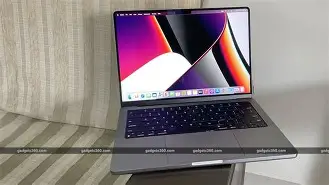
The 14" Liquid Retina XDR display is the first thing you notice after you power it on. The mini-LED backlight with local dimming gives really deep blacks and very high contrast. I worked on color-graded footage and long photo-editing sessions and found the display to be very faithful and bright enough for editing outside or in a bright room.
ProMotion (120Hz) makes scrolling and window movement feel silky. I was initially skeptical about whether I'd care, but after months of daily use I can say the smoother motion is one of those tiny refinements that changes the overall feel of the machine. The only oddity is the notch at the top of the screen; macOS handles it mostly gracefully, but certain full-screen apps and older apps can be slightly awkward until they are updated. I rarely found the notch to be a deal-breaker, but it is something you'll notice.
Performance — fast, predictable, and efficient
In my configuration the M1 Pro is a powerhouse for the kinds of tasks I throw at a laptop. Compiling large projects, exporting 4K video timelines, and batch-processing RAW photos are all much faster than on my older Intel-based laptop. A couple of real-world notes from my testing:
- I can run a full build of a medium-sized codebase in a fraction of the time it used to take. Iteration feels faster, which directly improves productivity.
- HandBrake exports and Final Cut Pro exports are noticeably quicker; for long exports the laptop sustains throughput without severe thermal throttling thanks to the improved cooling system.
- I threw some extreme workloads at it (simultaneously compiling, running Docker containers, and editing video). The system handled them well but fans do ramp up under sustained heavy load. The noise is not intrusive for me, but if you work in a very quiet environment you will notice it.
Battery life in my experience depends heavily on the workload. For writing, email, light browsing, and coding (with terminal and editor), I routinely saw 10–12 hours. For heavy video editing or prolonged virtualization, that drops to 3–5 hours. These are realistic numbers—battery life is excellent for day-to-day use but not magical under sustained professional loads.
Thermals and fan behavior
The thermal design is impressive for this size. Under sustained loads the MacBook Pro 14 does warm up on the underside and around the keyboard, but it rarely gets uncomfortably hot. Fans do become audible, and in very demanding tasks they will reach a noticeable level. I appreciated that fans ramp predictably and the machine maintains performance rather than throttling aggressively. If you need a completely silent laptop during heavy workloads, this is not it; but for most users the balance between noise and performance is well tuned.
Looking for the best Laptops & Computers deals on Amazon?
Shop Amazon →Keyboard, trackpad, and input
The keyboard is excellent in daily typing. The scissor mechanism (Magic Keyboard) is a big improvement over the problematic butterfly keyboard era, and key travel and feedback are satisfying for long typing sessions. I wrote many long documents without finger fatigue.
The trackpad remains the industry benchmark: huge, precise, and very responsive. Touch ID is built into the power button and works reliably for unlocking and authorizing purchases. I also liked the return of the physical function keys instead of the Touch Bar—after years of Touch Bar experimentation I personally preferred the tactile row.
Speakers, camera, and microphones
Apple improved the speaker system significantly. The MacBook Pro 14 has a wide soundstage and strong mid-range presence; listening to music while editing video was enjoyable without external speakers. The 1080p webcam is an upgrade over older MacBook cameras and produces a cleaner image for video calls, especially in decent lighting. Microphones are clear and do a solid job for meetings and recordings.
Ports and expandability
As I mentioned earlier, the inclusion of HDMI and an SD card slot is a big practical win. MagSafe is convenient (it disconnects safely), and the three Thunderbolt ports give flexibility for external GPUs, docks, and fast storage. I used the SD card slot daily for photo shoots and appreciated the convenience.
On expandability: the SSD and RAM are soldered/unified and not user-upgradeable. When configuring your machine, think ahead—if your workflow will grow into larger video projects, consider stepping up the memory and storage at purchase. For me, 16GB and 1TB have been adequate, but power users will want more.
Software and ecosystem
macOS on Apple Silicon feels cohesive and fast. Native apps that are optimized for the M1 Pro take full advantage of the unified memory and media engines. Rosetta 2 still works well for older Intel apps, but for best performance I prefer native versions. I also appreciate how seamless it is to move between devices in the Apple ecosystem for tasks like AirDrop, Handoff, and Universal Control when paired with an iPad.
Real-world workflows — what I actually used it for
Photo editing: I edit in Lightroom and Pixelmator—cataloging and batch exports with this machine are much faster than my previous laptop. The display and color accuracy are useful for critical work.
Video editing: I edit 4K footage in Final Cut Pro and Premiere Pro. Final Cut Pro is optimized and performs exceptionally; Premiere does well, though some exports are faster in Final Cut. Heat and fan noise are manageable during timeline playback; renders were significantly faster.
Development: I run Docker for development, large compiles, and local servers. The combination of fast single-core and multi-core performance cut down my iteration time. Battery life while coding is excellent when I'm not running heavy containers—I've taken full workdays without plugging in for email, terminal, and light tests.
Looking for the best Laptops & Computers deals on Amazon?
Shop Amazon →Longevity and reliability
After months of daily use the machine has felt stable and reliable. The build quality suggests it will hold up physically. The one caveat is that, like all modern laptops, it is less repairable than older models—so considering AppleCare or a reliable backup plan is sensible if uptime is critical to you.
Pros & Cons
- Pros:
- Exceptional display—mini-LED, ProMotion, excellent brightness and contrast
- Very strong performance for compiles, photo and video work
- Practical port selection (HDMI, SD, MagSafe, three TB4 ports)
- Excellent keyboard and best-in-class trackpad
- Good battery life for mixed/light workloads
- Cons:
- Not user-upgradeable—RAM and SSD are fixed at purchase
- Fans can get noticeable under heavy sustained loads
- The notch can still cause layout quirks in some apps
- Higher starting price, especially for upgraded RAM/SSD
Quick comparison
| Model | Screen | Typical CPU/GPU | RAM (typical) | My observed battery life | Weight | Best for |
|---|---|---|---|---|---|---|
| MacBook Pro 14 (2021) | 14" Liquid Retina XDR, ProMotion | M1 Pro (10-core) / M1 Max options | 16GB–64GB | 10–12 hrs light, 3–5 hrs heavy | ~3.5 lbs | Pros who need a portable but powerful machine |
| MacBook Air (M2, 2022) | 13.6" Liquid Retina (no mini-LED) | M2 (8-core CPU) | 8GB–24GB | 12–18 hrs light | ~2.7 lbs | Everyday users and students prioritizing portability |
| MacBook Pro 16 (2021) | 16" Liquid Retina XDR | M1 Pro / M1 Max (bigger GPU options) | 16GB–64GB | 8–11 hrs light, less heavy | ~4.8 lbs | Power users who prefer a larger workstation display |
Who should buy the MacBook Pro 14 (2021)?
In my experience the 14" model is the sweet spot if you want serious performance but still value portability. Buy it if:
- You routinely do photo or video work and want fast exports and a great built-in display.
- You are a developer who compiles large projects and benefits from fast multi-core performance.
- You travel and need a laptop that balances power and weight.
- You want modern I/O without a bunch of dongles (SD, HDMI, MagSafe are built in).
Be cautious about buying it if:
- You need the lightest possible laptop and your workloads are lightweight—in that case the MacBook Air is a better battery/price choice.
- You need a fully silent laptop under sustained loads—fans will ramp under heavy work.
- You have future-proofing concerns and can't accept fixed RAM/SSD—plan to order the right configuration up front.
Buying guide — how to choose the right configuration
Here are practical tips based on how I've used my machine:
- Processor: The M1 Pro (10-core) is plenty for most pros. If you regularly work with multi-stream 8K footage, or run extremely GPU-heavy ML training, consider M1 Max.
- Memory: 16GB is good for photography and moderate video work; 32GB or more is worth the investment if you do complex video timelines, heavy virtualization, or large ML datasets. I chose 16GB and have been okay, but there are moments where swapping would help.
- Storage: SSDs are fast, but they fill up—if you keep lots of raw media locally, opt for 1TB or higher. External fast NVMe via TB4 is an option, but internal speed is the most convenient.
- Charger: The included charger is fine. If you want faster top-up between sessions, a higher-wattage USB-C PD charger will reduce charging time.
- AppleCare: If you rely on the laptop for client work, AppleCare+ can be worthwhile for peace of mind.
Final thoughts — is the hype justified?
After several months with the MacBook Pro 14 (2021), I can say that much of the hype is justified. The combination of the mini-LED display, ProMotion, robust I/O, and the performance of Apple Silicon in a compact form factor makes this one of the most useful laptops I have owned. It doesn't feel like a marketing exercise; it feels like a machine built with professionals in mind.
That said, it isn't perfect. The fixed RAM and storage make configuration decisions important at purchase, the notch sometimes introduces small software quirks, and the fans are audible under sustained heavy work. Those are real trade-offs, but for my mix of development and creative work the advantages outweigh the downsides.
If you're a creative professional or a developer who wants a portable device that can meaningfully replace a desktop for many tasks, I found the MacBook Pro 14 to be an excellent choice. If your needs are lighter or your budget is tighter, you might find a better value elsewhere—but as a daily driver that shrinks the gap between laptop and desktop, it has been one of the most satisfying purchases I've made in recent years.